district-ui-web3-tx-log

Clojurescript re-mount module, that provides reagent UI component for transaction log, as well as related re-frame events and subscriptions.
Installation
Add into your project.clj:

Include [district.ui.web3-tx-log] in your CLJS file, where you use mount/start
API Overview
Warning: district0x modules are still in early stages, therefore API can change in a future.
- district.ui.web3-tx-log
- district.ui.component.tx-log
- district.ui.web3-tx-log.subs
- district.ui.web3-tx-log.events
- district.ui.web3-tx-log.queries
district.ui.web3-tx-log
This namespace contains web3-tx-log mount module.
You can pass following args to initiate this module:
:open-on-tx-hash?Pass true for opening transaction log automatically when user sends a new tx to the network:tx-costs-currenciesList of currency rates to load, so transaction cost can be displayed in those currencies:disable-using-localstorage?Pass true if you don't want to store transaction log settings in browser's localstorage:etherscan-urlPass root url as a string e.g. "https://etherscan.io" (the default) or "https://ropsten.etherscan.io" to configure transaction log links..:default-settingsPass default settings. Following options are available::from-active-address-only?Shows transactions only made by currently active address:open?Whether transaction log is open or not
  (ns my-district.core
    (:require [mount.core :as mount]
              [district.ui.web3-tx-log]))

  (-> (mount/with-args
        {:web3 {:url "https://mainnet.infura.io/"}
         :web3-tx-log {:open-on-tx-hash? true
                       :tx-costs-currencies [:USD]}})
    (mount/start))
district.ui.component.tx-log
Namespace with reagent component for transaction log and its subcomponents. Components don't come with styling, you need to provide own CSS. Currently, there can be only 1 transaction log per app.
tx-log
Main transaction log UI component. It cointains all subcomponents below.
Component props (besides standard reagent props):
:tx-cost-currency- Currency to display transaction cost in:header-props- Props passed to header component:header-el- Pass reagent component if you want to replace header component with your own:settings-props- Props passed to settings component:settings-el- Pass reagent component if you want to replace settings component with your own:transactions-props- Props passed to transactions component:transactions-el- Pass reagent component if you want to replace transactions component with your own
(ns my-district.core
    (:require [district.ui.component.tx-log :refer [tx-log]]))

  (defn home-page []
    [tx-log
     {:tx-cost-currency :USD
      :header-props {:text "My Transaction Log"}
      :class "my-tx-log-class"}])
In order for transaction log to work properly, you need to pass following data about a transaction under the key
:tx-log when sending a transaction with district-ui-web3-tx module:
:nameHuman readable name for a transaction. Will be displayed by tx-name:related-hrefHref to go to, after user clicks on a transaction in transaction log. Either a string or a map:{:name district.page/index :param :foo :query {:x :y}}
(ns my-district.events
    (:require [district.ui.web3-tx.events :as tx-events]))

(dispatch [::tx-events/send-tx {:instance MyContract
                                :fn :my-function
                                :args [1]
                                :tx-opts {:from my-account :gas 4500000}
                                :tx-log {:name "Called My Function"
                                         :related-href "/some-page"}}])
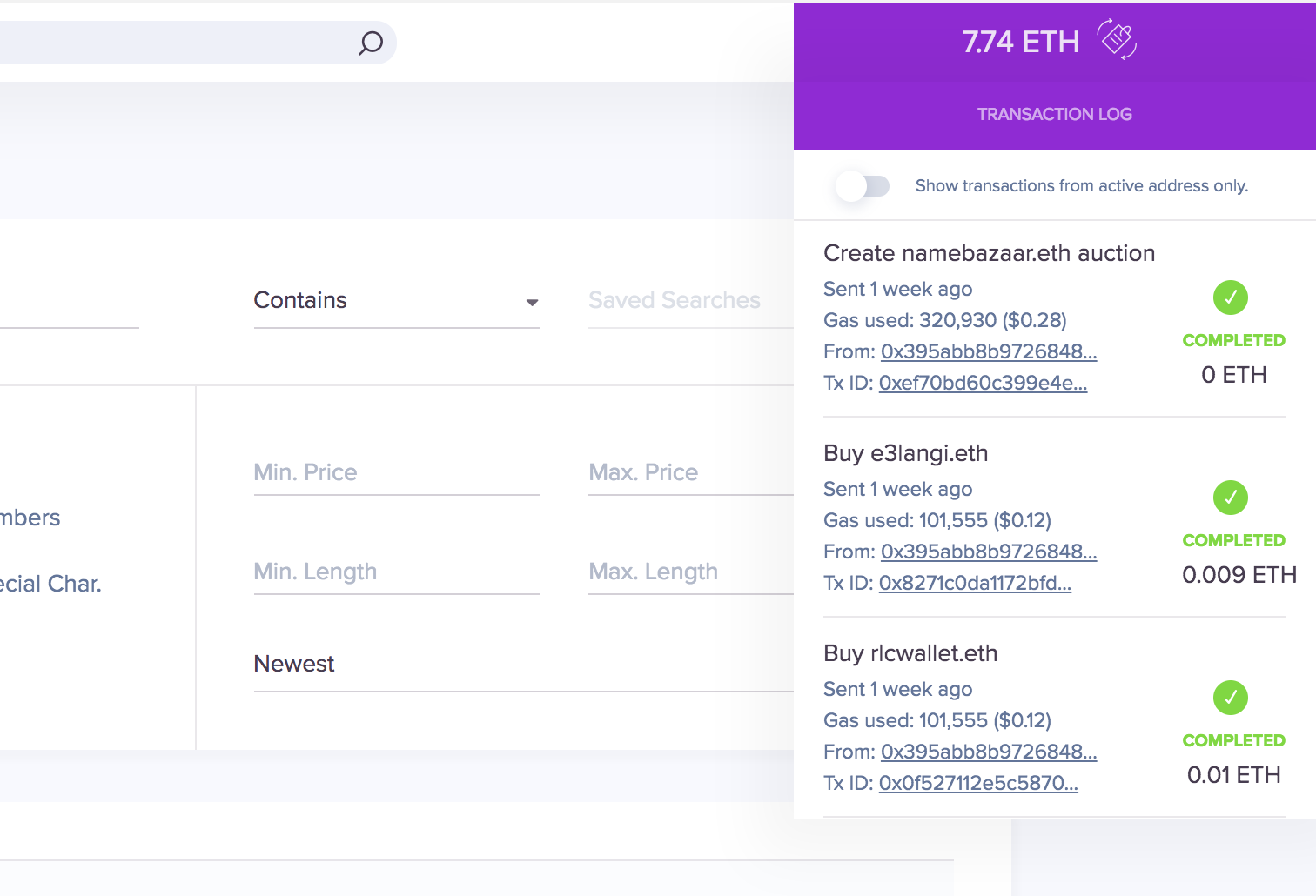
An example of transaction log UI component might look like this:
header
Header component of transaction log.
Component props:
:text- Text displayed in the header
settings
Settings component of transaction log.
Component props:
:from-active-address-only-toggle-props- Props passed to from-active-address-only-toggle component:from-active-address-only-toggle-el- Pass reagent component if you want to replace from-active-address-only-toggle component with your own
transactions
List of transactions component of transaction log.
Component props:
:transaction-props- Props passed to transaction component:transaction-el- Pass reagent component if you want to replace transaction component with your own:no-transactions-props- Props passed to no-transactions component:no-transactions-el- Pass reagent component if you want to replace no-transactions component with your own
no-transactions
Component displayed when there are no transactions, instead of list of transactions
Component props:
:textDisplayed text
transaction
Component of each transaction in transaction log
Component props:
:tx- Transaction data:tx-name-props- Props passed to tx-name component:tx-name-el- Pass reagent component if you want to replace tx-name component with your own:tx-created-on-props- Props passed to tx-created-on component:tx-created-on-el- Pass reagent component if you want to replace tx-created-on component with your own:tx-gas-props- Props passed to tx-gas component:tx-gas-el- Pass reagent component if you want to replace tx-gas component with your own:tx-from-props- Props passed to tx-from component:tx-from-el- Pass reagent component if you want to replace tx-from component with your own:tx-id-props- Props passed to tx-id component:tx-id-el- Pass reagent component if you want to replace tx-id component with your own:tx-status-props- Props passed to tx-status component:tx-status-el- Pass reagent component if you want to replace tx-status component with your own:tx-value-props- Props passed to tx-value component:tx-value-el- Pass reagent component if you want to replace tx-value component with your own:tx-remove-props- Props passed to tx-remove component:tx-remove-el- Pass reagent component if you want to replace tx-remove component with your own
tx-name
Component that displays name of a transaction.
Component props:
:tx- Transaction data
tx-created-on
Component that displays creation time of a transaction.
Component props:
:tx- Transaction data:label- Label text
tx-gas
Component that displays gas usage with a gas cost.
Component props:
:tx- Transaction data:tx-cost-currency- Currency to display transaction cost in:label- Label text
tx-from
Component that displays address from which a transaction was sent.
Component props:
:tx- Transaction data:label- Label text
tx-id
Component that displays transaction id with link to the etherscan.
Component props:
:tx- Transaction data:label- Label text next to the time
tx-status
Component that displays transaction status
Component props:
:tx- Transaction data
tx-value
Component that displays transaction value in Ether
Component props:
:tx- Transaction data
tx-remove
Component that serves as a button to remove a transaction.
Component props:
:tx- Transaction data
district.ui.web3-tx-log.subs
re-frame subscriptions provided by this module:
::txs
Returns list of transactions in for transaction log.
::settings
Returns current transaction log settings.
::open?
True if transaction log is currently open
district.ui.web3-tx-log.events
re-frame events provided by this module:
::set-open [open?]
Sets whether transaction log should open or not.
::set-settings [settings]
Sets settings for transaction log.
::clear-localstorage
Clears transaction log settings from localstorage.
district.ui.web3-tx-log.queries
DB queries provided by this module:
You should use them in your events, instead of trying to get this module's
data directly with get-in into re-frame db.
settings [db]
Works the same way as sub ::settings
from-active-address-only? [db]
True if setting :from-active-address-only? is on, to show transactions only from active address.
open? [db]
Works the same way as sub ::open?
txs [db]
Works the same way as sub ::txs
merge-settings [db settings]
Merges new settings in returns new re-frame db
localstorage-disabled? [db]
True if localstorage is disabled for this module
Dependency on other district UI modules
Development
lein deps
# Start ganache blockchain with 1s block time
ganache-cli -p 8549 -b 1 --noVMErrorsOnRPCResponse
# To run tests and rerun on changes
lein doo chrome tests
Can you improve this documentation? These fine people already did:
madvas, fbielejec & Filip BielejecEdit on GitHub
cljdoc builds & hosts documentation for Clojure/Script libraries
| Ctrl+k | Jump to recent docs |
| ← | Move to previous article |
| → | Move to next article |
| Ctrl+/ | Jump to the search field |