Liking cljdoc? Tell your friends :D

reagent-mui-nested-menu

Clojars Project npm cljdoc License: MIT

Nested MUI menu components for Reagent/ClojureScript and React.

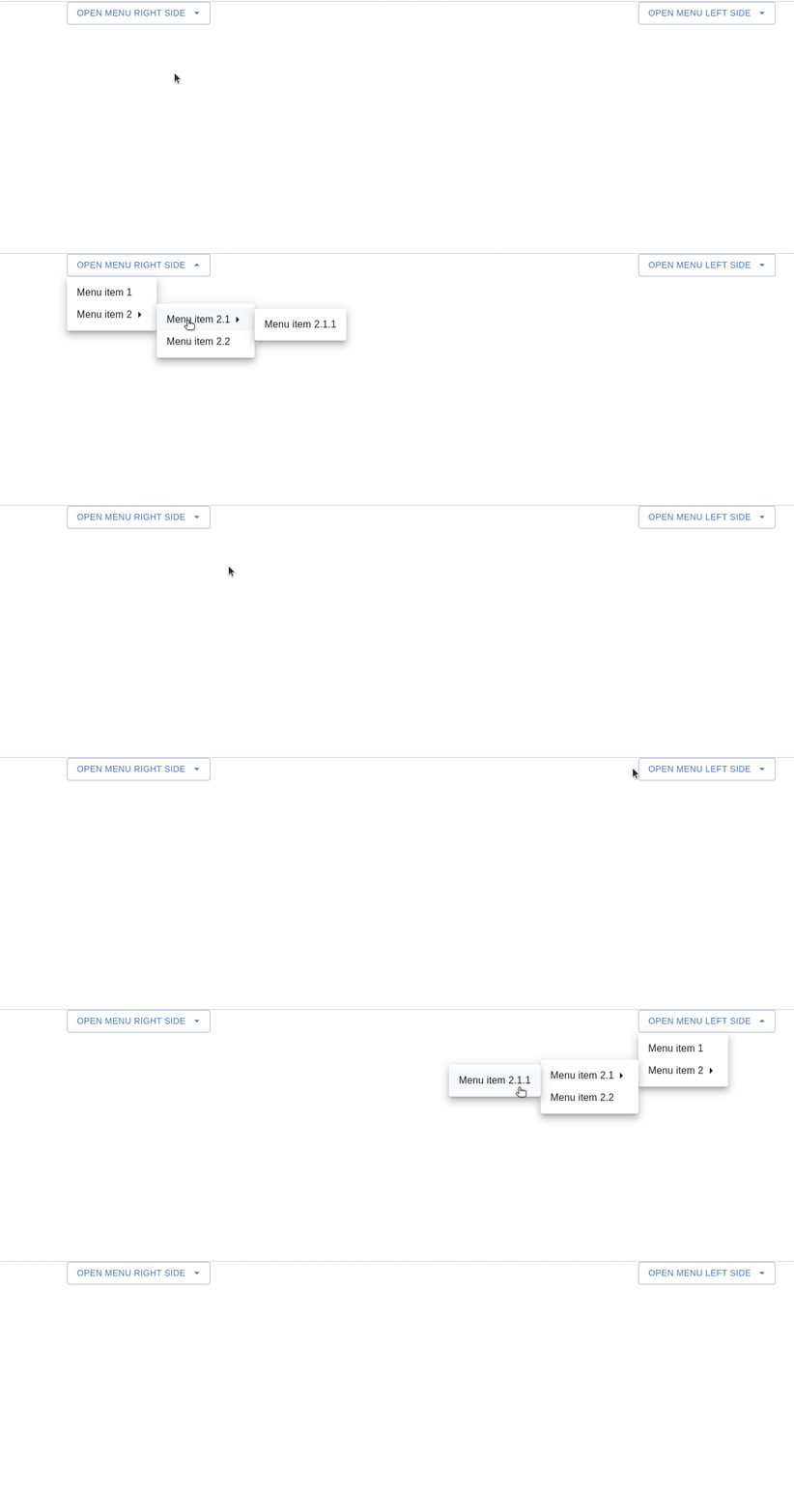
A ClojureScript port (and superset) of mui-nested-menu by steviebuilds: a dropdown that opens arbitrarily deep nested menus, a right-click context menu, per-item icons, custom labels, keyboard navigation and selection state.

  • Self-contained: no external CSS required; pointer-events and caret rotation are applied inline.
  • Broad MUI support: works with @mui/material v5–v9 via subpath imports and inline style (not sx), so nothing depends on a specific MUI version.
  • Two consumers: published to Clojars (Reagent) and npm (React).

Example GIF

Install

ClojureScript (Clojars)

deps.edn:

{:deps {io.github.jramosg/reagent-mui-nested-menu {:mvn/version "0.0.1"}
        reagent/reagent {:mvn/version "2.0.0"}}}

React (npm)

npm install reagent-mui-nested-menu

Peer dependencies

MUI and React are peers (you provide them). Emotion is required by MUI v5–v6 and is optional from MUI v7 onward.

{
  "peerDependencies": {
    "@mui/material": ">=5 <10",
    "react": ">=17 <20",
    "react-dom": ">=17 <20",
    "@emotion/react": ">=11",
    "@emotion/styled": ">=11"
  }
}

Quick start (CLJS)

(ns my.app
  (:require [reagent-mui-nested-menu.core :refer [nested-menu]]))

[nested-menu
 {:button-props {:label "Open"}
  :items [{:label "New file" :callback (fn [_e _item] (prn "new"))}
          {:label "Export"
           :items [{:label "PDF"  :callback (fn [_e _item] (prn "pdf"))}
                   {:label "JSON" :callback (fn [_e _item] (prn "json"))}]}]}]

No CSS import needed.

Components

All components live in the single public namespace reagent-mui-nested-menu.core:

ComponentPurpose
nested-menuDropdown button that opens a nested menu.
context-menuWrap content so a right-click opens a nested menu at the pointer.
nested-menu-itemA single menu item that opens a sub-menu (low-level).
icon-menu-itemA single leaf menu item with optional icons (low-level).
menu-items-from-dataBuild a seq of menu elements from item data.
chevron-right / chevron-downThe default MUI SvgIcon chevrons.

nested-menu (dropdown)

[nested-menu
 {:items        items        ;; vector of item maps (see below)
  :label        "Actions"    ;; button text (or :label inside :button-props)
  :button-props {...}         ;; props forwarded to MUI Button
  :menu-props   {...}         ;; props forwarded to the root MUI Menu
  :direction    :right        ;; :right (default) or :left
  :value        :high         ;; currently selected value (highlights leaves)
  :on-click     (fn [e] ...)}] ;; extra handler when the button is clicked

context-menu (right-click)

[context-menu
 {:items items}                ;; same item maps as nested-menu
 [:div {:style {:height 200}}
  "Right-click anywhere in here"]]

Item maps

Every item passed to :items accepts:

KeyTypeDescription
:labelstringItem text.
:render-label(fn [] hiccup)Custom label; takes precedence over :label.
:left-iconhiccup/elementRendered before the label.
:right-iconhiccup/elementRendered after the label (defaults to a chevron for sub-menus).
:callback(fn [event item])Called when a leaf is clicked, then the menu closes.
:itemsvectorChild items — turns this entry into a sub-menu.
:disabledbooleanDisable the item.
:delaynumberms to hover before the sub-menu opens (default 0).
:valueanySelection value; highlighted when it equals the root :value.
:sxmapForwarded to the MUI MenuItem (MUI v5+ only).
:uidstringStable React key (otherwise :label/index is used).

Clicking an item with :items opens its sub-menu and skips :callback. Only leaf items invoke :callback.

Icons example

(:require ["@mui/icons-material/ContentCopy" :default CopyIcon]
          [reagent.core :as r])

[nested-menu
 {:label "Edit"
  :items [{:label "Copy"
           :left-icon (r/create-element CopyIcon)
           :callback (fn [_e _item] (copy!))}
          {:label "Disabled" :disabled true}]}]

React usage

The npm build ships real React components. Reagent components are reactified and JS props convert automatically: buttonProps becomes :button-props, leftIcon becomes :left-icon, and so on. Pass icons as JSX elements and items as plain objects.

It ships as dual ESM + CommonJS: named imports work in Vite/webpack/esbuild and require() works in Node:

import { NestedMenu, ContextMenu } from 'reagent-mui-nested-menu';

const items = [
  { label: 'New file', callback: () => console.log('new') },
  {
    label: 'Export',
    items: [
      { label: 'PDF', callback: () => console.log('pdf') },
      { label: 'JSON', disabled: true },
    ],
  },
];

<NestedMenu buttonProps={{ label: 'Open' }} items={items} direction="left" />

<ContextMenu items={items}>
  <div>Right-click here</div>
</ContextMenu>

Named exports: NestedMenu, ContextMenu, NestedMenuItem, IconMenuItem, ChevronRight, ChevronDown. Props are camelCase (buttonProps, menuProps, leftIcon, rightIcon, renderLabel). See demo-react/ for a runnable example.

Styling

Nothing is required. Sub-menu pointer-events and the dropdown caret rotation are inline style, so the components work with zero CSS on any MUI version.

The library emits these namespaced class hooks for optional theming:

  • .jnm-menu — every Menu rendered by the library (dropdown, sub-menus, context menu).
  • .jnm-submenu — additionally on nested sub-menu Menu elements.
  • .jnm-menu-item — each item that opens a sub-menu.
  • .jnm-caret / .jnm-caret-expanded — the dropdown caret.

Style individual items with :sx (MUI v5+) or :style on the item map. Overriding the caret rotation via class requires !important because the rotation is inline.

Build & publish

npm

npm run release:library   # builds dist/cjs (CommonJS) + dist/esm (ESM)
npm publish

Clojars (via Slim / tools.build)

The library is published under the group io.github.jramosg, which Clojars auto-verifies for the GitHub user jramosg. Clojars walks you through group verification on first deploy (https://clojars.org/verify/group). To publish your own fork, change :lib in the :build alias of deps.edn to your own group, e.g. io.github.<your-user>/reagent-mui-nested-menu or net.clojars.<your-user>/reagent-mui-nested-menu.

  1. Create a Clojars account, then a deploy token at https://clojars.org/tokens (use the token as the password — never your account password).

  2. Export credentials:

    export CLOJARS_USERNAME=your-clojars-username
    export CLOJARS_PASSWORD=your-deploy-token
    
  3. Build and deploy:

    clojure -T:build build                   # build the jar locally (optional)
    clojure -T:build deploy :snapshot true   # publish a -SNAPSHOT
    clojure -T:build deploy                   # publish a release
    

Bump :version in the :build alias of deps.edn (and deps.edn's install snippet above) for each release.

Tests

Unit tests cover the data-driven menu builder (no DOM needed) and run on Node via shadow-cljs:

npm test   # npx shadow-cljs compile test && node target/node-tests.js

Demos

cd demo && npm install && npm run start   # ClojureScript + Reagent
cd demo-react && npm install && npm run dev  # React + MUI

Credits

Port of mui-nested-menu by steviebuilds.

License

MIT.

Can you improve this documentation? These fine people already did:
Jon, Jon Ramos & j-ramos
Edit on GitHub

cljdoc builds & hosts documentation for Clojure/Script libraries

Keyboard shortcuts
Ctrl+kJump to recent docs
Move to previous article
Move to next article
Ctrl+/Jump to the search field
× close